 c0ac01a34a
This commit changes the Magikeyboard service behavior so that KeePassDX
is able to run in Samsung DeX mode. Currently, the app cannot run in
DeX mode because apps which have services using `BIND_INPUT_METHOD` are
blocked.

A new broadcast receiver has been added to listen for DeX's enter/leave
events [1] and disable/enable the `Magikeyboard` service appropriately.
The enabled state of a service lives in the Android framework's
`PackageManager` and survives app crashes and device reboots (though it
does get reset when app data is cleared).

Additionally, an extra check is added to `FileDatabaseSelectActivity` to
ensure the service's enabled state is correct. This is necessary if the
app crashes or is force quit within DeX mode and then the user exits DeX
mode. Otherwise, the service would stay disabled until the user entered
and exited DeX again.

With the new behavior, KeePassDX will generally just work with DeX,
though there's one caveat: after the initial installation, the user must
open the app once outside of DeX. Otherwise, Android will not trigger
the broadcast receiver. This could be fixed by making the service
intially disabled in the manifest with `android:enabled="false"`, but
Android's Settings app in SDK 15 through 25 does not correctly refresh
the keyboard list when changing the service from disabled to enabled.
I opted *not* to introduce different behavior based on the API version.

[1] https://developer.samsung.com/sdp/blog/en-us/2017/07/27/samsung-dex-how-to-detect-the-samsung-dex-mode

Fixes: #245
Signed-off-by: Andrew Gunnerson <chillermillerlong@hotmail.com>
Android KeePassDX
 KeePassDX is a multi-format KeePass manager for Android devices. The app allows creating keys and passwords in a secure way by integrating with the Android design standards.
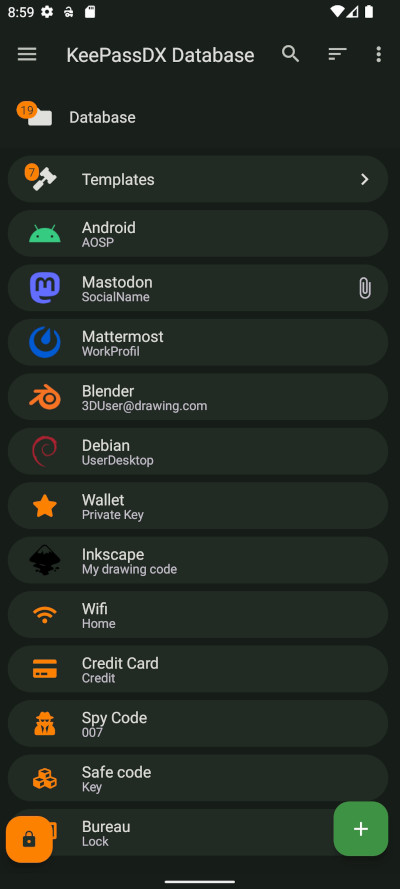
Features
- Create database files / entries and groups.
- Support for .kdb and .kdbx files (version 1 to 4) with AES - Twofish - ChaCha20 - Argon2 algorithm.
- Compatible with the majority of alternative programs (KeePass, KeePassX, KeePassXC, …).
- Allows opening and copying URI / URL fields quickly.
- Biometric recognition for fast unlocking (fingerprint / face unlock / …).
- One-Time Password management (HOTP / TOTP) for Two-factor authentication (2FA).
- Material design with themes.
- Auto-Fill and Integration.
- Field filling keyboard.
- History of each entry.
- Precise management of settings.
- Code written in native languages (Kotlin / Java / JNI / C).
KeePassDX is open source and ad-free.
What is KeePassDX?
An alternative to remembering an endless list of passwords manually. This is made more difficult by using different passwords for each account. If you use one password everywhere and security fails only one of those places, it grants access to your e-mail account, website, etc, and you may not know about it or notice, before bad things happen.
KeePassDX is a password manager for Android, which helps you manage your passwords in a secure way. You can put all your passwords in one database, locked with a master key and/or a keyfile. You only have to remember one single master password and/or select the keyfile to unlock the whole database. The databases are encrypted using the best and most secure encryption algorithms currently known.
Small print?
KeePassDX is under open source GPL3 license, meaning you can use, study, change and share it at will. Copyleft ensures it stays that way. From the full source, anyone can build, fork, and check whether for example the encryption algorithms are implemented correctly. There is no advertising.
Do not worry, the main features remain completely free.
Optional visual styles are accessible after a contribution (and a congratulatory message (Ո‿Ո) ) or the purchase of an extended version to encourage contribution to the work of open source projects! If you contribute to the project and do not have access to the styles, do not hesitate to contact the author at contact@kunzisoft.com.
Contributions
- Add features by making a pull request.
- Help to translate KeePassDX to your language (on Weblate or by sending a pull request).
- Donate 人◕ ‿‿ ◕人Y for a better service and a quick development of your features.
- Buy the Pro version of KeePassDX.
Download
F-Droid is the recommended way of installing, a libre software project that verifies that all the libraries and app code is libre software.


Frequently Asked Questions
Other questions? You can read the FAQ
Other devices
-
KeePass (https://keepass.info/) is the original and official project for the desktop, with technical documentation for standardized database files. It is updated regularly with active maintenance (written in C#).
-
KeePassXC (https://keepassxc.org/) is an alternative integration of KeePass written in C++.
-
KeeWeb (https://keeweb.info/) is a web version that is also compatible with KeePass files.
License
Copyright © 2020 Jeremy Jamet / Kunzisoft.
This file is part of KeePassDX.
KeePassDX is free software: you can redistribute it and/or modify it under the terms of the GNU General Public License as published by the Free Software Foundation, either version 3 of the License, or (at your option) any later version.
KeePassDX is distributed in the hope that it will be useful, but WITHOUT ANY WARRANTY; without even the implied warranty of MERCHANTABILITY or FITNESS FOR A PARTICULAR PURPOSE. See the GNU General Public License for more details.
You should have received a copy of the GNU General Public License along with KeePassDX. If not, see http://www.gnu.org/licenses/.
This project is a fork of KeePassDroid by bpellin.